|
Edit Rule :: WebGuard
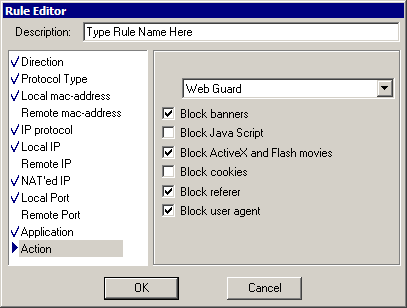
This window allows to edit default Web Guard settings. User can override these settings within webguard tab on main window.
- Block Banners - this will block banners images it their size looks like a banner size or their URL is in black list (see webguard configuration for more information)
- Block Java Script - this will block java and visual basic scripts on a webpage
- Block ActiveX and Flash movies - this will not allow to load any ActiveX of Flash content
- Block Cookies - this will block cookies. Cookies are used to identify your computer on websites. Cookies may and may not contain personal information like email or postal address.
- Block Referer - this will block referer field in HTTP request header. Referers are used to identify a webpage you came from.
- Block User Agent - this will block user agent field in HTTP request header.
|